


Understand your Korean payslip.
See an estimate of your overtime, weekly holiday pay (주차수당), and deductions. Built for E-9 workers and other foreign workers in South Korea.
We're an independent tool, not the Korean government. These numbers are estimates. Your real payslip is what counts.
Choose your phone above. Android is live on Google Play, free to download. On iPhone? We'll email you the moment the App Store version is ready.

Privacy first
Your payslip photos are analyzed and immediately discarded. We don't store the numbers either.
Official rates
Estimates use the 2026 Korean Labor Standards Act and government-published deduction rates.
In your language
English, 한국어, Tagalog, Tiếng Việt, ภาษาไทย, မြန်မာ, 简体中文, සිංහල. More on the way.
The problem
Korean payslips are confusing. Your pay shouldn't have to be.
If you work in Korea on an E-9 visa, you've probably stared at your payslip wondering what each line means. Hourly rate, overtime, weekly holiday pay, deductions: the math is hard to follow, especially if Korean isn't your first language.
EPS PayMate AI estimates each line for you. We use Korea's official labor rates. You compare against your real payslip and ask the right questions if something looks off.
Across Asia
Built for workers coming to Korea from across Asia.
Around 300,000 workers in South Korea are on E-9 EPS visas, recruited from 17 partner countries. We're starting with 8 languages and adding more.
What it does
Built for the way EPS workers actually get paid.
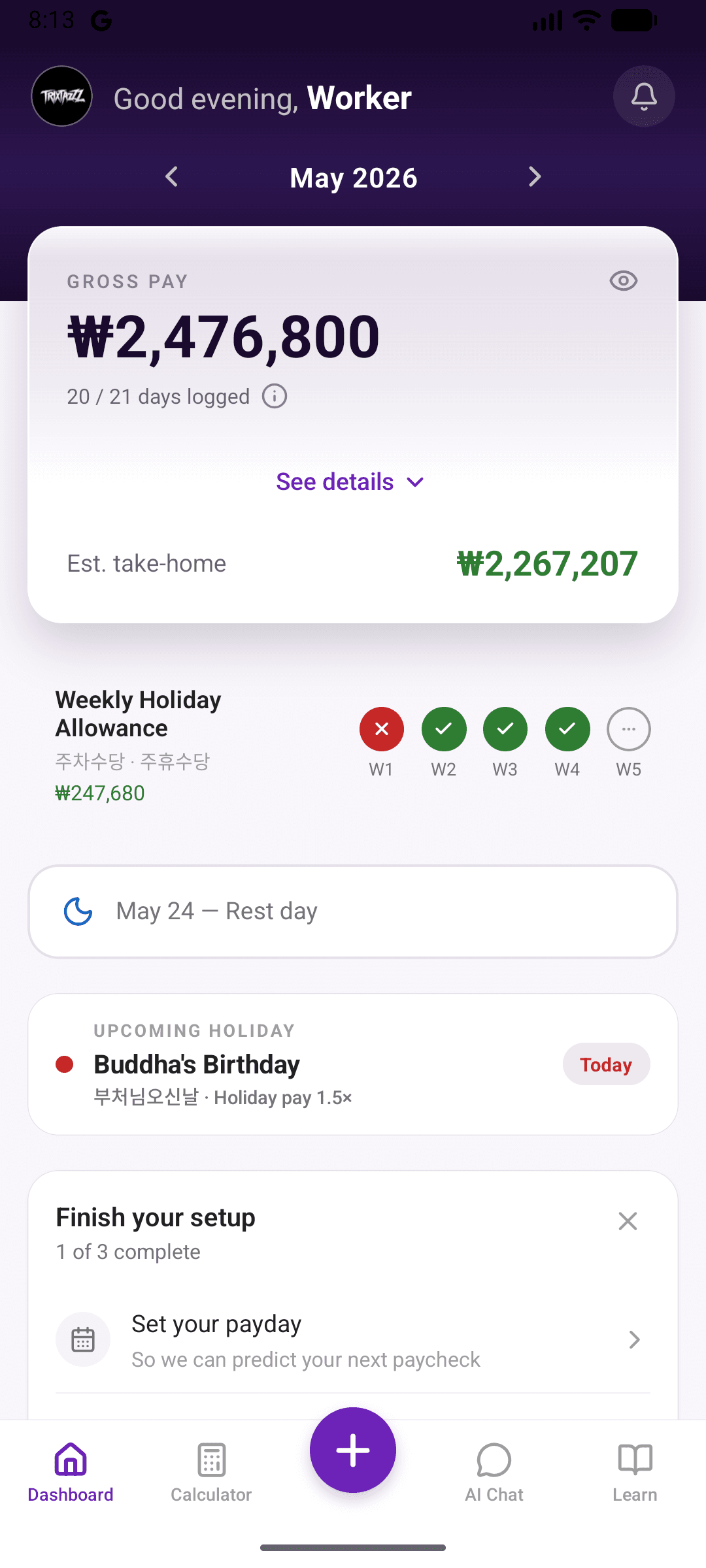
Salary estimates
Estimates from Korea's official labor rates
Overtime, night shift, holiday pay, weekly holiday pay: each one estimated using the published Labor Standards Act rates for 2026. Your actual payslip and your company's policies decide the real number. The app helps you see the breakdown.
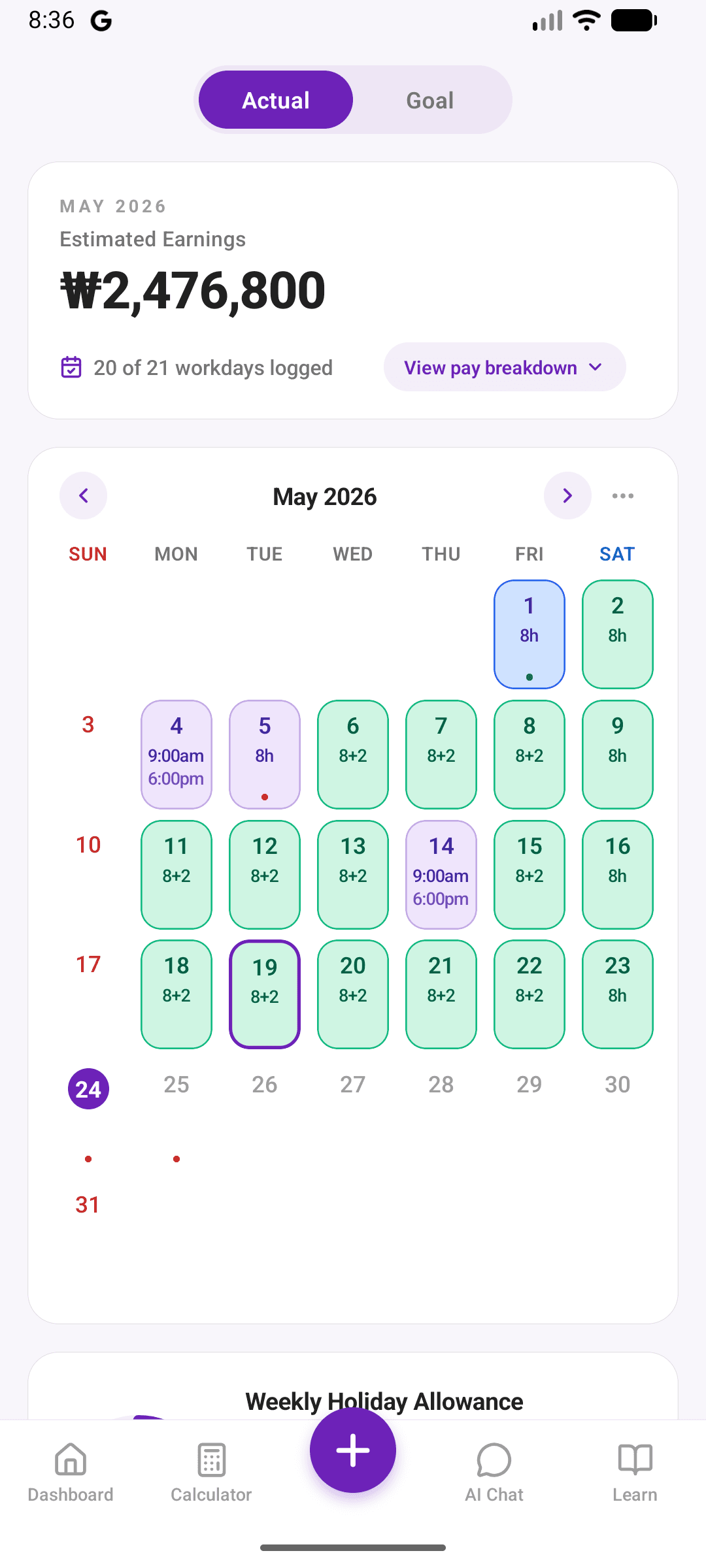
Hour tracking
Log your hours, watch your monthly pay estimate grow
Tap to log your shifts. The app updates your monthly pay estimate as you go. Use it to compare against your payslip when payday comes.
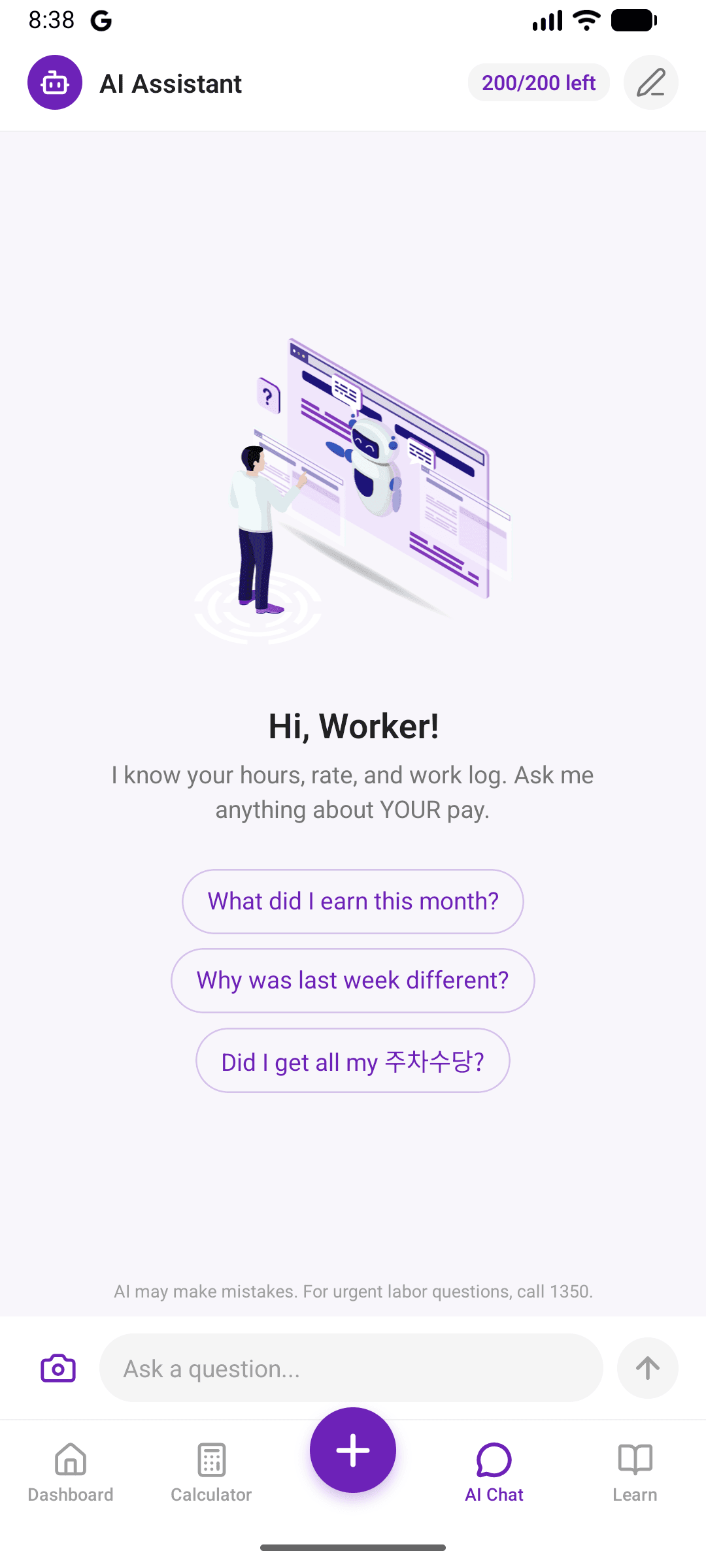
AI assistant
Ask questions about your pay in your own language
Not sure what a deduction means? Confused about a Korean labor term? Ask the AI in your own language. For anything serious like wage disputes, contract questions, or legal issues, we always point you to the Korean labor hotline (1350) first.
Compare your payslip
Scan your payslip. See if the math matches your hours.
Take a photo of your payslip. The AI reads it, lines the numbers up against the hours you logged, and tells you if it's a strong match or where the gap is.
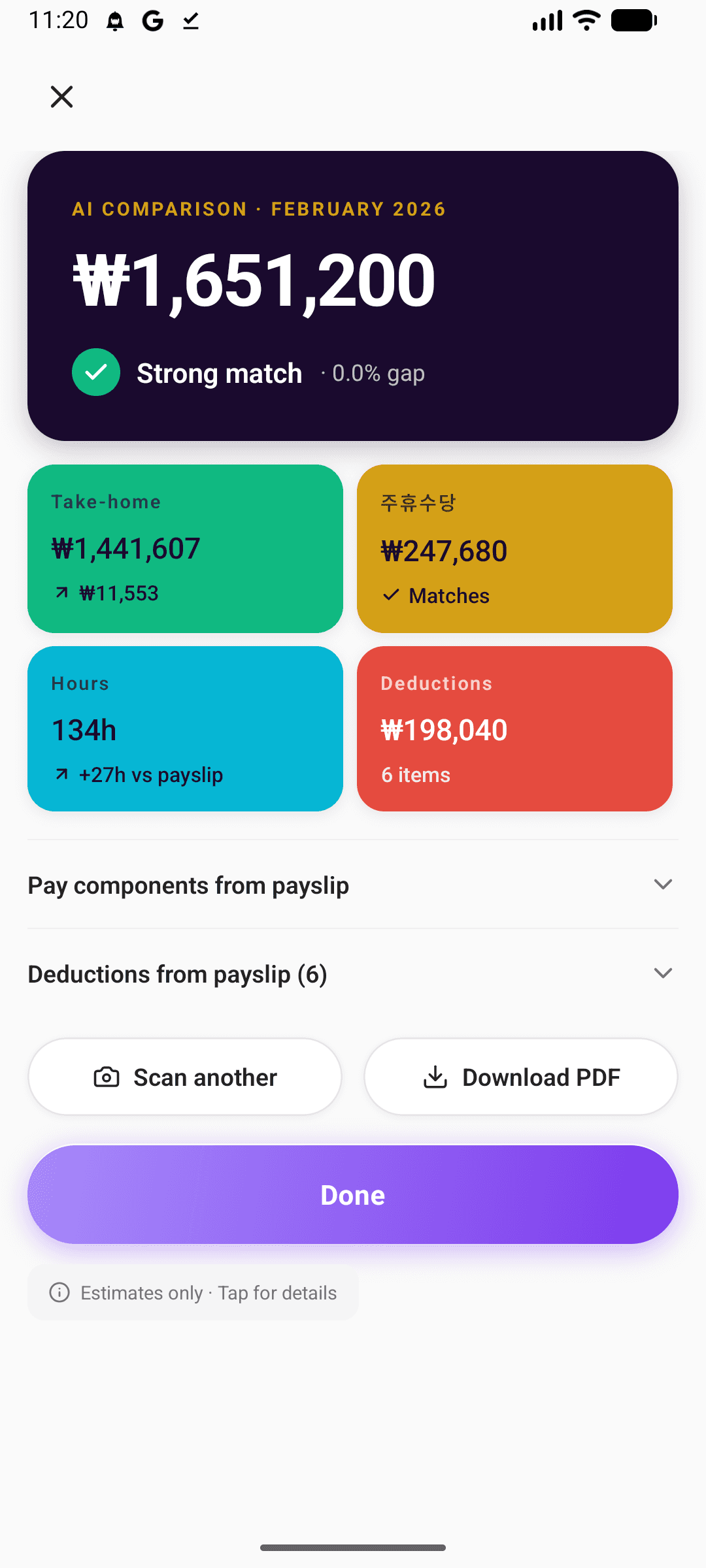
Take a photo of your payslip from inside the app.
The AI reads the take-home, 주휴수당, hours, and deductions.
See each line lined up against your logged hours. Strong match, or a clear gap.
We do not store your payslip
Your photo is sent to our AI provider, read, and immediately discarded. Nothing about your payslip ever lives on our servers. The only thing that stays is the PDF comparison report you choose to download, and that lives on your device.
1 free scan to try. PRO unlocks 5 scans every month.
Getting started
How it works
01
Set your hourly rate
Enter your hourly wage. Takes 30 seconds. You can add your visa type later in your profile.
02
Log your work hours
Tap your shifts as you work. The app updates your pay estimate as you go.
03
See your pay estimate, broken down
View an estimate of overtime, weekly holiday pay, deductions, and take-home pay. Each line broken down so you understand it. Compare against your real payslip.
Plus a Learn tab inside the app, with articles on Korean pay rules and official labor links, in your language.
About
A quick honest note
EPS PayMate AI is an independent tool, notthe Korean government. We're not affiliated with HRD Korea, MOEL, or the Korean EPS program. Here's what that means in practice.
What we will never do
- We will never store your payslip photos.
- We will never store the numbers extracted from your payslip.
- We will never claim to be the Korean government or an official labor service.
- We will never charge fees outside the App Store or Google Play.
- We will never sell your data.
For serious questions
Call the Korean labor hotline. It's free, multilingual, and run by MOEL.
More with PRO
Plan your saving. Track every won. Get AI advice.
One screen for income, expenses, and remittances. AI that reads your month and tells you the story. Built into the same app.
Budget Tracker
One screen for income, expenses, and remittances.
The hero PRO surface. Set a monthly goal, log every won that comes in and goes out, watch your remittances stack up. The AI Goal Coach button is right there, so you can ask for advice without leaving the screen.
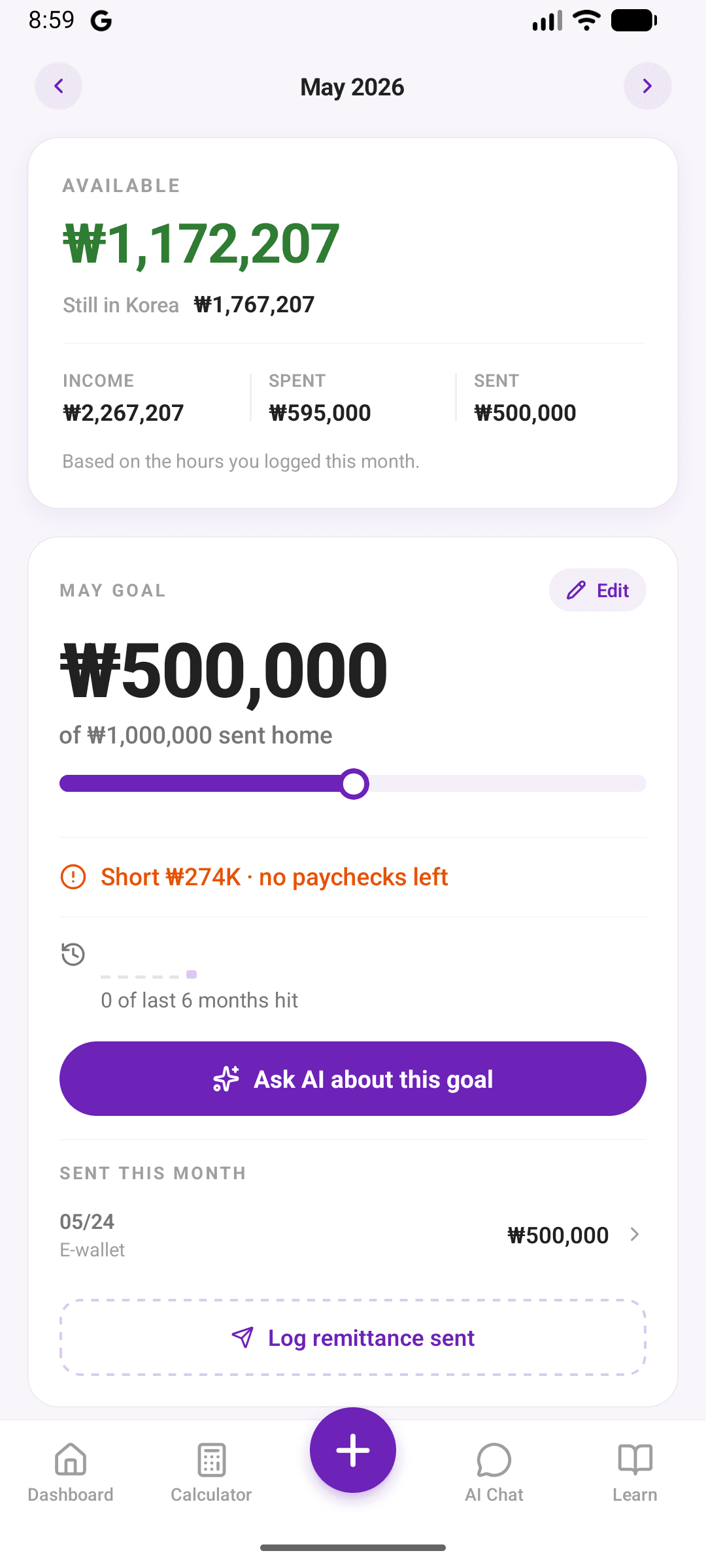
Income · Goals
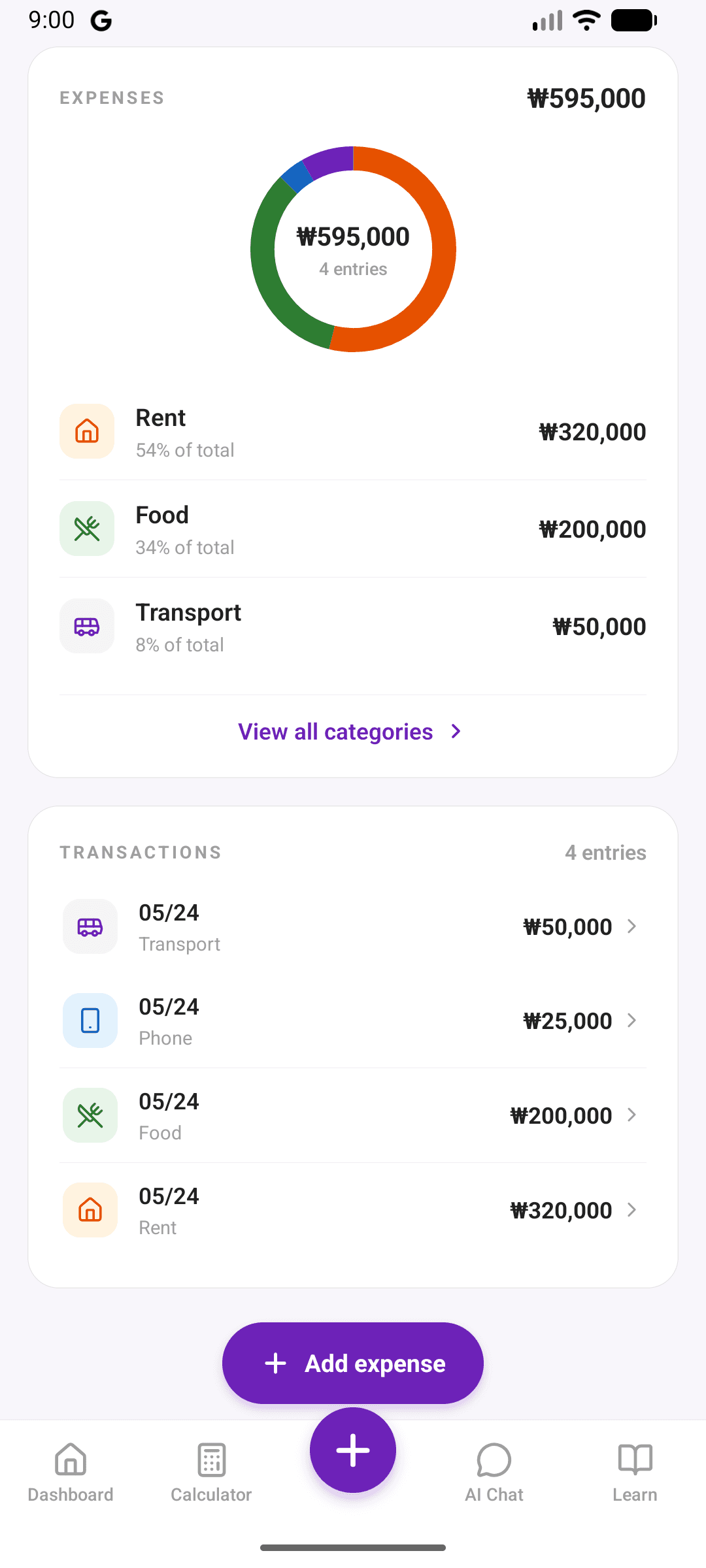
Expenses · Transactions
Smart Insights
AI that reads your month and tells you the story.
Monthly Story narrates what actually happened across your hours, pay, and goals. It lives on your Dashboard at month-end. Goal Coach (visible above) gives you advice in the moment, inside Budget Tracker.
You worked 187 hours this month, including 22 hours of overtime. Take-home came out to ₩2.41M, up ₩180k from April. You hit your remittance goal four days early.
Ask the AI about your hours, rate, and deductions. Every month.
Compare a real payslip against your logged hours. Every month.
Pricing
Free for everyone. PRO for power users.
Subscriptions are managed inside the app through your App Store or Google Play account. There's no website checkout.
Free
Forever
- No ads, ever
- All salary estimates
- Weekly holiday pay tracker
- Cloud sync across devices
- 8 languages, with more on the way
- 10 AI chat messages (lifetime)
- 1 AI payslip scan (lifetime)
Available in the app
PRO
or ₩39,900 / year (save ~32%)
- Everything in Free
- 200 AI chat messages per month
- 5 AI payslip scans per month
- Download payslip comparison reports as PDF (stays on your device)
- Budget Tracker
- Smart insights (Monthly Story, Goal Coach)
Available in the app
Questions
Frequently asked questions
Get the app
Try it on your phone.
Free to use. Android is live on Google Play. On iPhone, join the waitlist and we'll email you when it's ready.